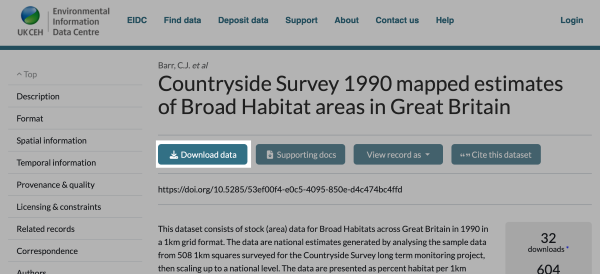
Having found a data resource that is of interest, you can download a copy.
If a dataset in catalogue is available, a "Download the data" link will be present in the detailed view for that record.
The relevant Terms & Conditions of use of the data will be shown and you will be asked to confirm your acceptance. (If you have already accepted the terms of the licence on a previous visit, this stage will be skipped).
Small datasets are usually provided by our data packager. When you click on a link to download the data, you'll receive a ZIP file which contains all the data files plus licence conditions and supporting documentation to help you interpret the data.
For large datasets such as CHESS-met, the data is made available via http and you will see a list of available files. You can download files via a web browser or you can use tools such as WGET (see below).
For a small number of datasets, (e.g. some Land Cover Map products) you may be asked to complete a few more steps in order to customise the download to your requirements. Such datasets are sent to your email. The time taken to prepare your data and send it by email depends on the size of the dataset and its complexity. In the vast majority of cases, it is sent within 5-10 minutes. However, some may take several hours. If you have not received download instructions within 24 hours, you should email eidc@ceh.ac.uk, quoting your order number.
Some datasets can be accessed programmatically using command-line and scripting tools such as wget, curl, or Windows PowerShell Invoke-WebRequest.
To access the data using these tools, you must use a Personal Access Token (PAT). Personal Access Tokens provide a secure alternative to using a username and password. For help on creating and managing Personal Access Tokens, see: https://eidc.ac.uk/help/personalaccesstokens
Pass your Personal Access Token in the Authorization header using the --header option:
wget FILE_TO_DOWNLOAD
  --header="Authorization: Bearer YOUR_PERSONAL_ACCESS_TOKEN"
For example:
wget "https://catalogue.ceh.ac.uk/datastore/eidchub/835a50df-e74f-4bfb-b593-804fd61d5eab/sfcWind/chess-met_sfcWind_gb_1km_daily_19610901-19610930.nc"
   --header="Authorization: Bearer pat_8MsKbGcQevdYM91_pHUD-w20kg_DdvbNIqeKzkeDp1E
Further information about using wget can be found in the GNU Wget documentation: https://www.gnu.org/software/wget/manual/wget.html
Pass your Personal Access Token in the Authorization header using the -H option:
curl "FILE_TO_DOWNLOAD" -L -O -H "Authorization: Bearer YOUR_PERSONAL_ACCESS_TOKEN"
-H adds the HTTP authorization header
-L follows any redirects
-O saves the file using the same filename as the source URL
For example:
curl "https://catalogue.ceh.ac.uk/datastore/eidchub/835a50df-e74f-4bfb-b593-804fd61d5eab/sfcWind/chess-met_sfcWind_gb_1km_daily_19610901-19610930.nc"
  -L
  -O
  -H "Authorization: Bearer pat_8MsKbGcQevdYM91_pHUD-w20kg_DdvbNIqeKzkeDp1E"
Further information about using curl can be found in the curl tutorial: https://curl.se/docs/tutorial.html
Some datasets require you to accept the dataset licence terms and conditions before they can be accessed programmatically. For example, the CHESS-met dataset: https://doi.org/10.5285/2ab15bf0-ad08-415c-ba64-831168be7293
Accepting the licence is a one-time process for each dataset.
Once you have accepted the licence, you can access the dataset using programmatic download tools such as wget and curl.